Viewing audit log
info
The Audit Log page allows you to view historical records of all admin actions in Pinpoint.
Overview
The Audit Log provides:
- Complete history of all admin events.
- Action filtering and, for super admins, space filtering
- Pagination for large datasets
Using the audit log
Viewing records
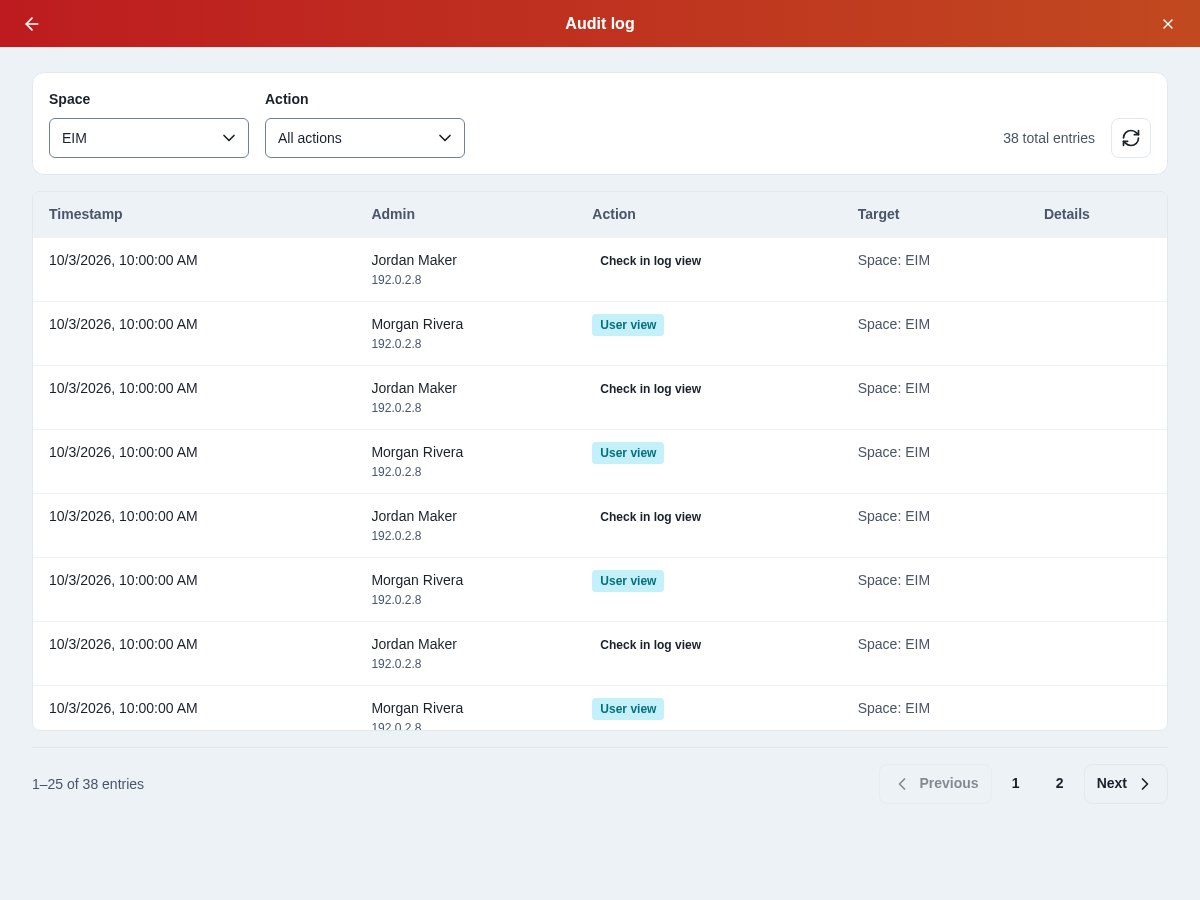
The audit log displays:
- Timestamp: When the action was performed
- Admin: The Admin who performed the action + their public IP address
- Action: What action was performed
- Target: The target of the action.
- For viewing user details, the target will be the user.
- For space related actions, the target will be the selected space.
Filtering records
Choose an Action to narrow the results, or All actions to clear that filter. Super admins can also choose a Space or All spaces. Results update when you change a filter.
Pagination
When viewing large datasets:
- Use the "Previous" and "Next" buttons to navigate between pages
- The pager shows the current page and record range; use its page selector to jump to another page
- Each page displays up to 25 records
Refreshing data
Click the refresh icon at the top to reload the latest audit log data.
Use cases
- Audit Trail: Review which admin did what
- Troubleshooting: Correlate when an issue started with when an admin performed an action